1.1 - Computer Systems & Embedded Systems
The purpose of computer systems
Computer systems are designed to handle data efficiently, performing tasks that would take humans much longer to complete. At their core, they follow a simple process: taking in data, processing it according to instructions, and producing an output.
Key functions of a computer system:
- Input - Receiving data.
- Processing - Manipulating the data.
- Output - Delivering results.
Hardware and software in computer systems
A computer system combines hardware and software to process data and complete tasks. These elements must work together seamlessly for the system to function.
Hardware
Hardware refers to the physical components that form the computer system. This includes internal parts like the central processing unit (CPU) and external devices.
Types of hardware:
- Internal hardware - Core elements inside the computer case, such as the motherboard and storage drives.
- External hardware (peripherals) - Devices connected outside the main case, including keyboards, mice, monitors, and printers, which allow user interaction and output.
Software
Software consists of the programs and applications that run on the hardware. It provides the instructions for what the hardware should do.
Examples of software:
- Operating systems
- Word processors
- Video games
Types of computer systems
Computer systems vary widely in size, complexity, and purpose. They can range from tiny devices to massive machines, each tailored to specific needs.
General purpose systems
General purpose systems are flexible computers designed to handle a wide variety of tasks.
Characteristics of general purpose systems:
- Examples - Personal computers (PCs) and tablets.
- Advantages - Versatile and adaptable to user needs, making them suitable for homes, offices, and schools.
Dedicated systems
Dedicated systems are built for a single specific function, focusing on efficiency for that one task.
Characteristics of dedicated systems:
- Examples - Systems controlling traffic lights or aeroplane navigation.
- Advantages - Often more reliable and optimised for their particular role compared to general purpose alternatives.
Other examples include small devices like calculators and watches, or large supercomputers used in banking or scientific research.
Embedded systems and their role
Embedded systems are specialised computers integrated into larger devices to perform dedicated functions. They are typically hidden within the device and operate without direct user interaction.
Characteristics of embedded systems:
- Integration - Built directly into products like dishwashers, microwaves, and televisions.
- Dedicated nature - Focused on one primary task, unlike general purpose computers that handle multiple activities.
Use as control systems
Embedded systems often act as control systems, monitoring conditions and adjusting machinery to achieve desired outcomes.
Example in a dishwasher:
- Controls water pumps and release mechanisms to manage water flow.
- Oversees different washing cycles (e.g., quick wash or intensive clean).
- Regulates the thermostat to maintain appropriate water temperature.
Advantages of embedded systems
Because embedded systems are dedicated to a single task, they offer several benefits over more versatile general purpose computers.
Key advantages:
- Ease of design - Simpler to develop since they focus on one function, reducing complexity in programming and hardware.
- Cost efficiency - Cheaper to produce due to streamlined components and no need for unnecessary features.
- Performance optimisation - More efficient at their specific task, using less power and resources while delivering reliable results.
Key internal components of computers
Computers rely on various internal components that work together to process data, manage power, and maintain performance. These are typically housed within the computer case and connected via the motherboard.
Main components and their functions:
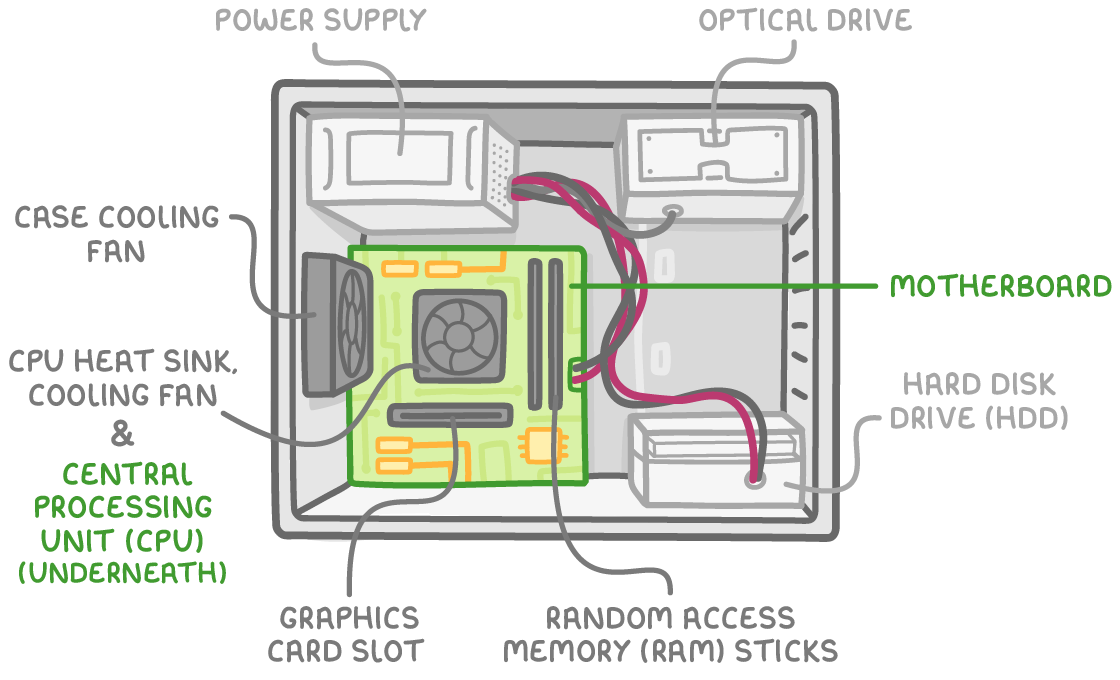
| Component | Function |
|---|---|
| Power supply | Provides electrical power to the motherboard, drives, and other hardware. |
| Case cooling fan | Removes hot air from the computer case to prevent overheating. |
| CPU heat sink and cooling fan | Attaches to the CPU to dissipate heat, keeping it at a stable temperature (CPUs produce significant heat during operation). |
| Central processing unit (CPU) | The brain of the computer; performs all data processing and calculations. |
| Graphics card slot | Connection point for a graphics card, which handles visual processing (e.g., for games or videos). |
| Motherboard | The central circuit board that connects and coordinates all hardware components. |
| Optical drive | Reads and writes data to optical discs like CDs or DVDs. |
| Random access memory (RAM) sticks | Provides temporary storage for data being actively used, allowing quick access by the CPU. |
| Hard disk drive (HDD) | Serves as internal secondary storage for long-term data retention. |