3.3 - Network Models
Introduction to network types
Networks allow devices to connect and share resources, such as files, printers, or internet access. When setting up a network, you must choose between different forms, including client-server and peer-to-peer (P2P) models. These differ in how devices communicate, manage resources, and handle security.
Client-server networks
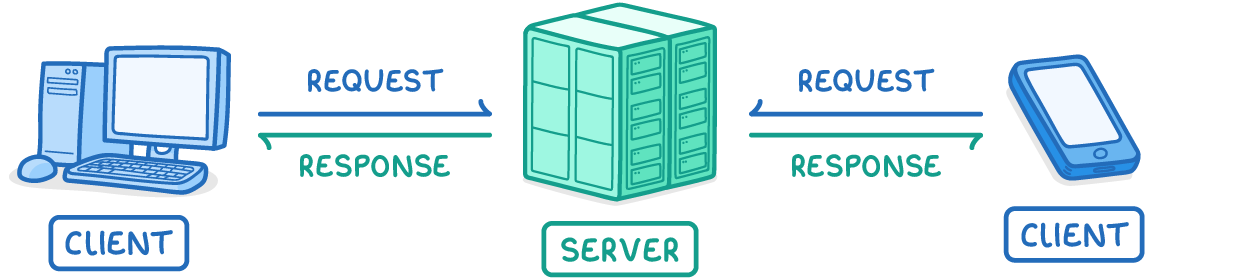
A client-server network is a type of network where a central device, known as the server, manages and provides services to other connected devices, called clients.
Key components and how they work
- Server - The central device that stores files, software, and data centrally. It processes requests from clients and sends responses.
- Clients - Devices like computers or smartphones that connect to the server to access resources. They send requests, such as asking for data or files, and receive responses from the server.
- Client-server relationship - Clients make requests, and the server handles them, often requiring authentication like passwords. The server also manages user profiles, access levels, and security, denying unauthorised requests.
Files and software are stored on the server rather than on individual clients, making management easier. Most internet services follow this model; for example, websites are hosted on web servers, and web browsers act as clients sending requests for web pages.
Advantages of client-server networks
- Centralised file management - Files are stored in one place, making it easier to track and organise them.
- Simplified backups - Backups can be performed centrally on the server, reducing the risk of data loss.
- Efficient software updates - Software can be installed or updated once on the server, applying to all clients.
- Strong security control - The server handles network security, such as anti-malware software and user access levels, making it easier to protect the network.
- High reliability - Servers are designed to be always on and dependable, supporting many clients simultaneously.
Disadvantages of client-server networks
- High setup costs - Requires expensive hardware and IT specialists to install and maintain the server and network.
- Server dependency - If the server fails, all clients lose access to resources and work.
- Potential overload - The server can become slow or unresponsive if too many clients send requests at the same time.
Peer-to-peer networks
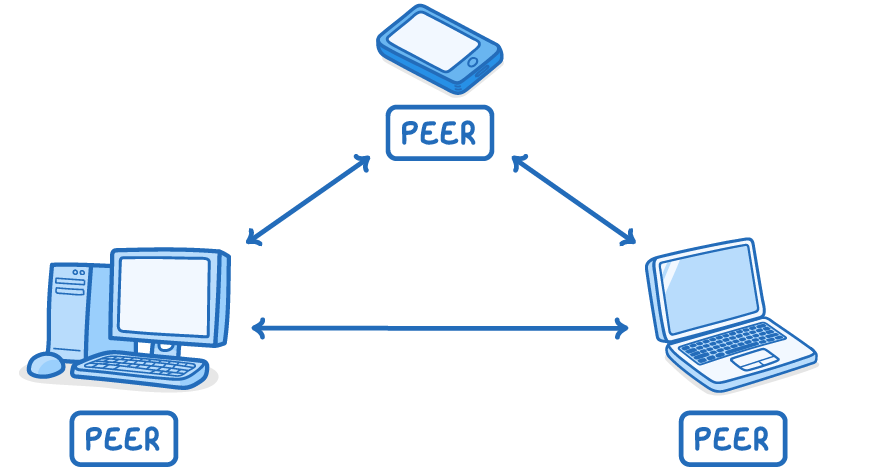
A peer-to-peer (P2P) network is a decentralised setup where all devices, known as peers, have equal status and connect directly to each other without a central server.
Key components and how they work
- Peers - All devices (e.g., computers, laptops, or smartphones) are equals, each capable of sharing resources directly with others.
- Direct connections - Devices connect without a server, sharing files stored on individual machines. For example, you might use a P2P network at home to share files between a computer and a printer or between multiple devices.
In this setup, there is no central control; each peer manages its own files and security. While most internet activities are client-server based, some applications like cryptocurrency networks or file-sharing services use P2P for direct peer connections.
Advantages of peer-to-peer networks
- Ease of maintenance - No need for specialised expertise or costly hardware, making it simple to set up and run.
- No single point of failure - If one device fails, the rest of the network remains operational, as there is no dependency on a central server.
Disadvantages of peer-to-peer networks
- Lack of centralised management - Updates, security measures (like anti-malware), and backups must be handled individually on each device, which can be time-consuming.
- File duplication issues - Copying files between devices creates duplicates, making it hard to track the latest versions and where files are stored.
- Reliability concerns - Peers are less dependable than dedicated servers; data could be lost if a device fails.
- Performance slowdowns - Devices may slow down when others access their resources, as they handle both their own tasks and sharing duties.
Comparing client-server and peer-to-peer networks
Client-server and peer-to-peer networks suit different needs, with client-server offering more structure for larger setups and P2P providing simplicity for smaller ones.
| Aspect | Client-server | Peer-to-peer |
|---|---|---|
| Structure | Central server manages clients | All devices are equals, no central server |
| File storage | Centralised on server | Decentralised on individual devices |
| Security management | Centralised, easier to control | Individual, more complicated |
| Typical use | Large networks, internet services (e.g., web hosting) | Small home networks, file sharing |
| Scalability | Handles many users but risks overload | Simple but less efficient for large groups |
| Reliability | High for server, but single failure point | No single failure point, but peers less reliable |
Client-server is dominant for most internet uses, such as accessing websites, while P2P is common in niche areas like legal file sharing or decentralised systems (though it can be misused for illegal sharing of copyrighted material). Choosing between them depends on factors like scale, cost, and required control.