3.4 - Network Topologies
Understanding network topologies
A network topology refers to the physical or logical arrangement of devices and connections in a computer network. This layout determines how data flows between devices, such as computers, servers, and switches. Different topologies offer varying levels of performance, reliability, and cost, making them suitable for specific scenarios. The most common topologies include star, mesh, bus, and ring, each with unique characteristics that affect network efficiency and resilience.
Features of star topology
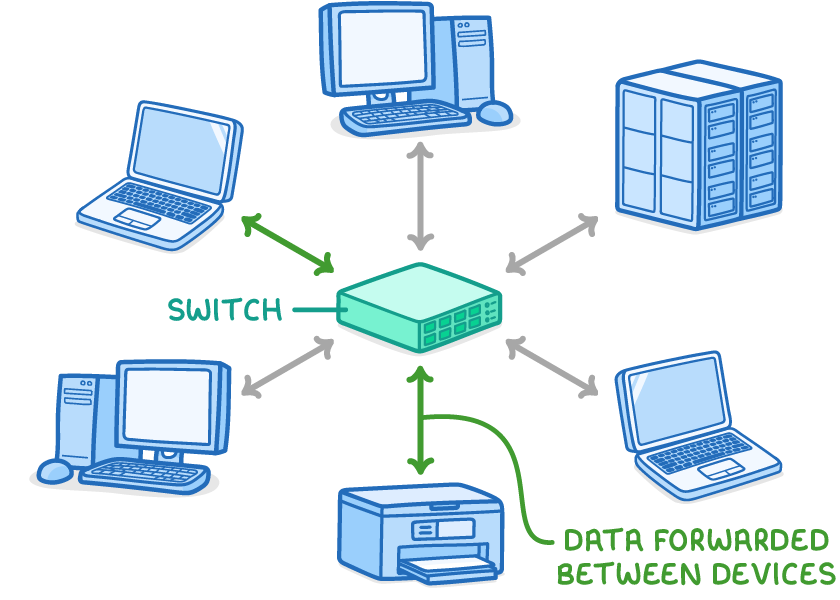
In a star topology, all devices connect directly to a central device, such as a switch or server, which manages data traffic. This central device forwards data between connected devices, allowing for efficient communication.
Star topologies can use either wired connections or wireless connections. This setup enables multiple devices to access shared resources, like a server, at the same time without significant interference.
Advantages and disadvantages of star topology
Star topology offers several benefits but also has limitations, particularly in larger setups.
Advantages of star topology
- Fault isolation - If one device fails or a connection is broken, the rest of the network remains operational, as issues do not spread.
- Ease of expansion - Adding new devices is straightforward, requiring only a connection to the central hub.
- Improved performance - Data travels directly to the central device, allowing simultaneous transmissions from multiple devices with minimal data collisions.
Disadvantages of star topology
- High cabling costs in wired setups - Each device needs its own cable to the central hub, which can be expensive for large areas, such as an office with many computers.
- Single point of failure - If the central switch or server malfunctions, the entire network stops working.
Comparison with bus and ring topologies
While star topology is widely used, it is helpful to compare it with traditional topologies like bus and ring to understand their differences in data flow and performance.
Bus topology
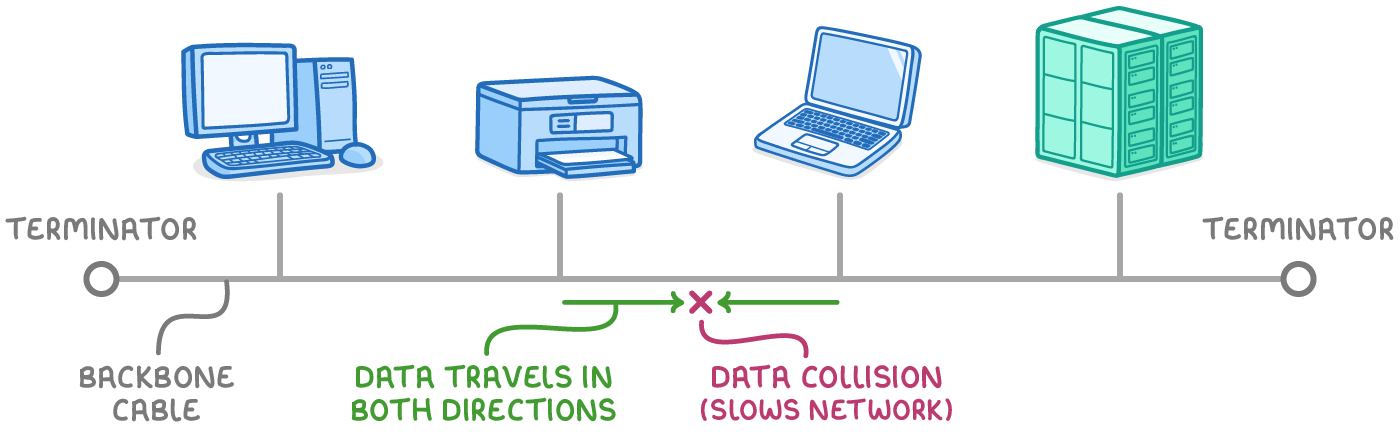
In a bus topology, all devices connect to a single shared cable, known as the backbone cable, with terminators at each end to prevent signal reflection. Data travels in both directions along this cable, which can lead to data collisions when multiple devices transmit simultaneously. This slows down the network, making it less efficient for high-traffic environments.
Ring topology
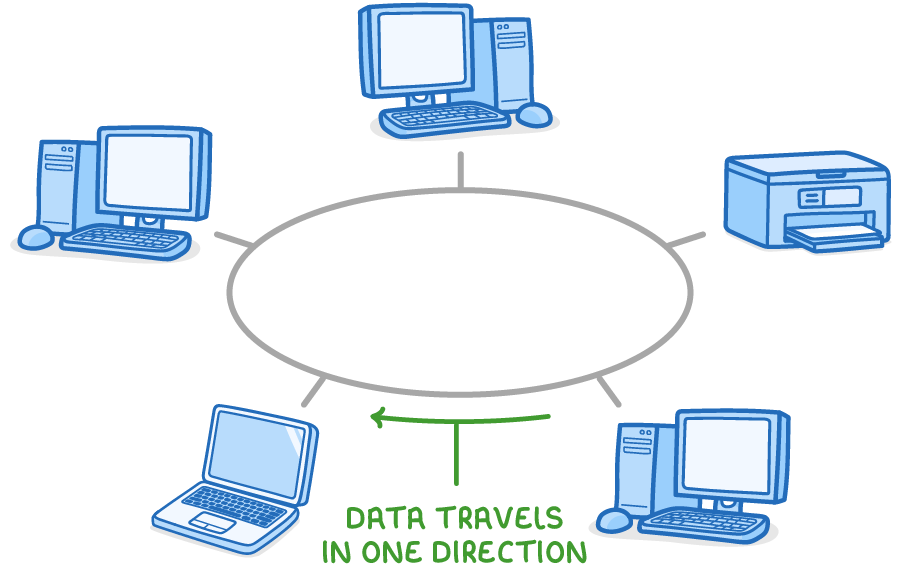
In a ring topology, devices form a closed loop where data travels in one direction around the circle. This unidirectional flow prevents collisions, but only one device can transmit at a time. Data must pass through every device in the loop to reach its destination, which can cause delays and make the network vulnerable if any single device or connection fails.
Features of mesh topology
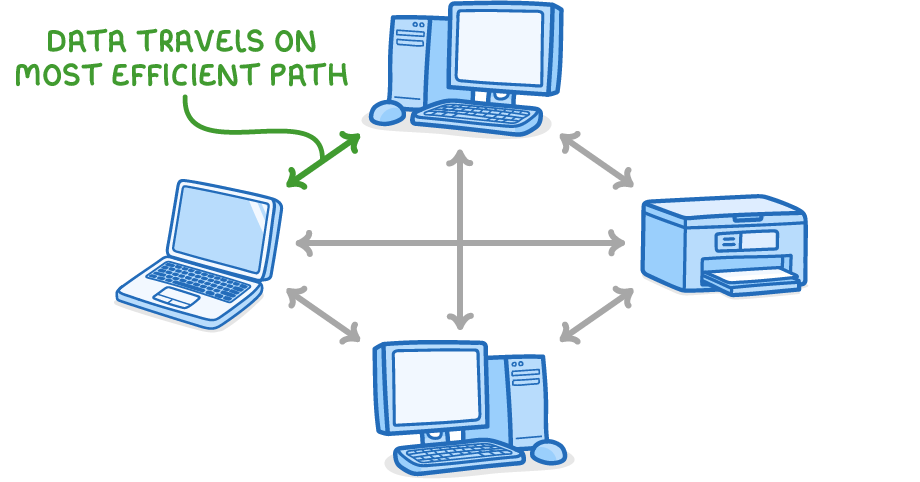
A mesh topology is a decentralised network layout where devices connect directly or indirectly to multiple others, without relying on a single central hub. Data travels along the most efficient path available, dynamically rerouting if needed. This setup is common in wireless networks, where connections form through radio signals rather than cables.
Mesh topologies eliminate the need for a central control point, making them highly adaptable. They are increasingly practical with wireless technology, as it reduces the cabling requirements that once made mesh expensive.
Advantages and disadvantages of mesh topology
Mesh topology excels in reliability but can be complex to implement.
Advantages of mesh topology
- High redundancy - There is no single point of failure; if one device or connection fails, data reroutes through alternative paths.
- Efficient data routing - Data takes the fastest available route, improving speed and reducing bottlenecks.
- Scalability in wireless setups - Wireless mesh networks are easier and cheaper to expand than wired ones, avoiding extensive cabling.
Disadvantages of mesh topology
- High setup costs in wired environments - Connecting every device to many others requires significant cabling, which can be costly and complex.
- Management complexity - The numerous connections make configuration and maintenance more challenging, especially in large networks.
Full and partial mesh topologies
Mesh topologies can be either full or partial, depending on the level of interconnection between devices.
Full mesh topology
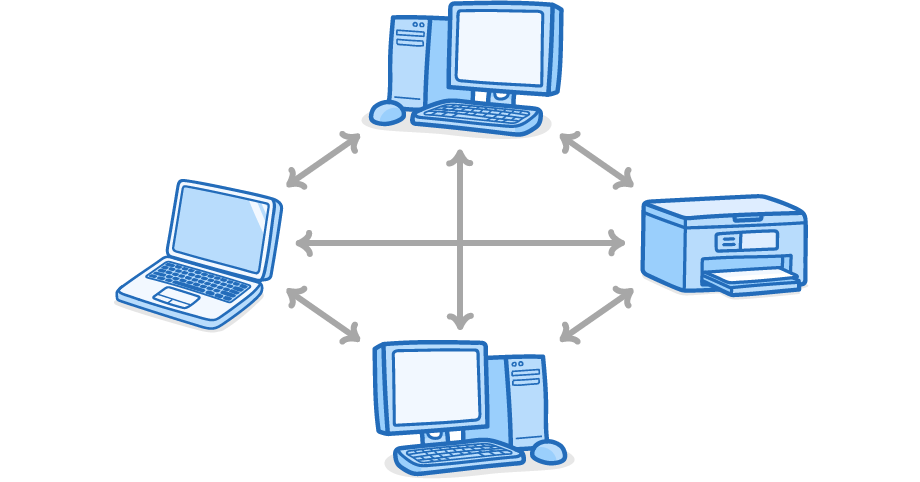
In a full mesh topology, every device connects directly to every other device in the network. This provides maximum redundancy and the shortest possible data paths but requires the most connections.
Partial mesh topology
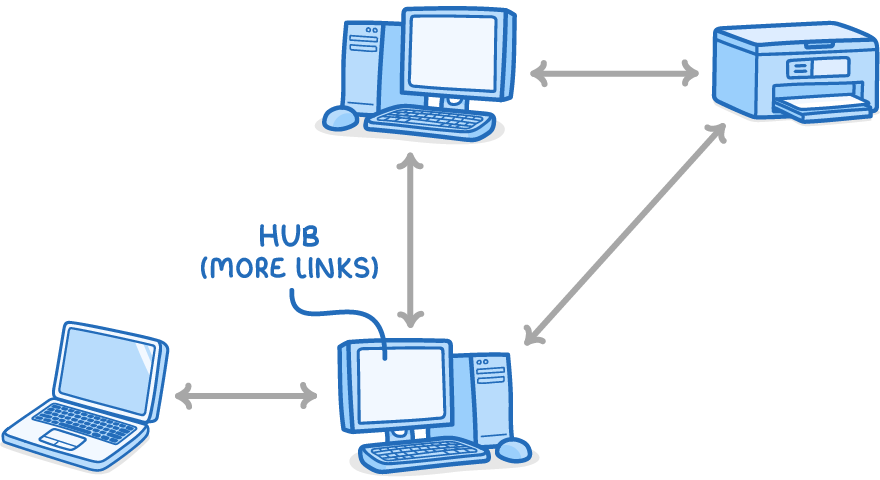
In a partial mesh topology, not all devices connect directly to every other; some have fewer connections, while others act as hubs with more links. This reduces complexity and cost compared to full mesh but may introduce slightly longer data paths or potential bottlenecks.