3.2 - Network Hardware
NICs, switches, and routers
Computer networks rely on specific hardware to connect devices and transmit data effectively. This hardware ensures that information can flow between devices on the same network or across different networks.
Network interface controllers
A network interface controller (NIC) is an internal hardware component that enables a device to connect to a network. It handles the communication between the device and the network.
Key features of NICs:
- NICs are typically built into a device's motherboard, though older systems used separate cards.
- They support both wired connections (using cables) and wireless connections (using radio waves).
Switches
A switch is a hardware device that connects multiple devices within a local area network (LAN), which is a network covering a small geographical area like a home or office.
How switches work:
- Switches receive data in units called frames from one device.
- They then forward these frames only to the intended recipient device on the network, using the device's media access control (MAC) address, which is a unique identifier assigned to network interfaces.
Routers
A router is a hardware device that transmits data between different networks, acting as a gateway.
Functions of routers:
- Routers connect to at least two networks, such as a home LAN and the wider internet.
- They handle data in units called packets and direct them to their correct destination across networks.
- On the internet, routers play a key role in routing packets efficiently to avoid congestion.
- In homes and offices, routers often combine multiple functions: they include a built-in switch for LAN connections and a wireless access point (WAP) for wireless connectivity.
Types of wired Ethernet connections
Wired networks use Ethernet technology to connect devices on a LAN, offering fast and reliable data transmission. Ethernet cables vary in type, each designed to minimise interference and support different performance levels.
Twisted pair cables

Twisted pair cables are the most common type used in Ethernet networks, consisting of pairs of copper wires twisted together to reduce interference.
Characteristics of twisted pair cables:
- The popular types are CAT 5e and CAT 6 cables.
- These contain four pairs of twisted copper wires (eight wires total), with colours like orange-white, green-white, blue-white, and brown-white.
- Twisting the pairs minimises internal electrical interference, ensuring reliable data transmission.
Coaxial cables
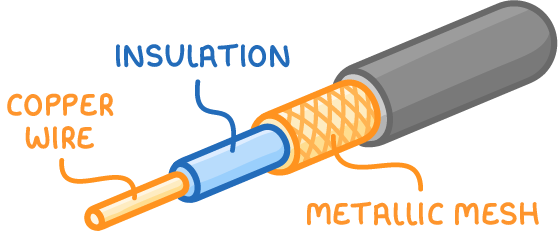
Coaxial cables provide an alternative for Ethernet connections, featuring a design that protects against external interference.
Structure of coaxial cables:
- They consist of a single central copper wire surrounded by an insulating plastic layer.
- Around the insulation is a metallic mesh that shields the cable from outside electrical interference.
Fibre optic cables
Fibre optic cables represent high-performance options for Ethernet networks, transmitting data using light signals.
Features of fibre optic cables:
- They use thin strands of glass or plastic fibres to carry light pulses representing data.
- Fibre optic cables do not suffer from electrical interference, making them ideal for long-distance transmission.
- They maintain signal quality over very large distances with minimal degradation.
- However, they are more expensive than other cable types, so they are often used in high-demand environments like data centres or backbone networks.
Wireless networks and their technologies
Wireless networks transmit data using radio waves instead of physical cables, offering flexibility and convenience. This eliminates the need for extensive wiring, though it may introduce challenges like signal range limitations.
Key features of wireless networks
Wireless networks operate similarly to technologies in mobile phones and televisions, using radio waves to send and receive data.
Advantages of wireless networks:
- They allow devices to connect without being physically tethered, enabling mobility within the network's range.
- Wireless setups are often cheaper to install than wired networks because they require fewer cables.
Wireless access points
A wireless access point (WAP) is a hardware device that enables wireless connections to a network.
Functions of wireless access points:
- It functions like a switch but allows devices to join the network wirelessly rather than via cables.
- WAPs are essential for setting up Wi-Fi networks and are often integrated into home routers.
Wireless network interface controllers
To connect to a wireless network, devices need a wireless NIC. This is usually built into modern devices like laptops and smartphones. If not built-in, a USB dongle can be used to add wireless capability (e.g., a Wi-Fi dongle for a computer or an HDMI dongle for a TV).
Comparing Bluetooth and Wi-Fi
Bluetooth and Wi-Fi are two widely used wireless technologies, each suited to different purposes. Bluetooth focuses on short-range, direct connections, while Wi-Fi supports broader network access. Both technologies use radio waves, but Wi-Fi is better for high-speed, multi-device networks, while Bluetooth excels in simple, low-power connections.