8.5 - IF & SWITCH
What is program flow
Program flow describes the sequence in which a program's instructions are executed. You can influence program flow using selection statements, which allow the program to make decisions based on conditions or values. The two main types are IF statements and SWITCH statements.
If statements and their basic structure
IF statements are a type of selection statement that check whether a condition is true or false, then perform different actions based on the result. They follow an IF-THEN-ELSE structure, where the program evaluates a condition and branches accordingly.
How if statements work
- Conditions are expressions that can be true or false.
- If the condition is true, the program executes the code after THEN.
- If false, it runs the code after ELSE (if present).
- Proper indentation makes the code easier to read and understand.
Example of a simple if statement
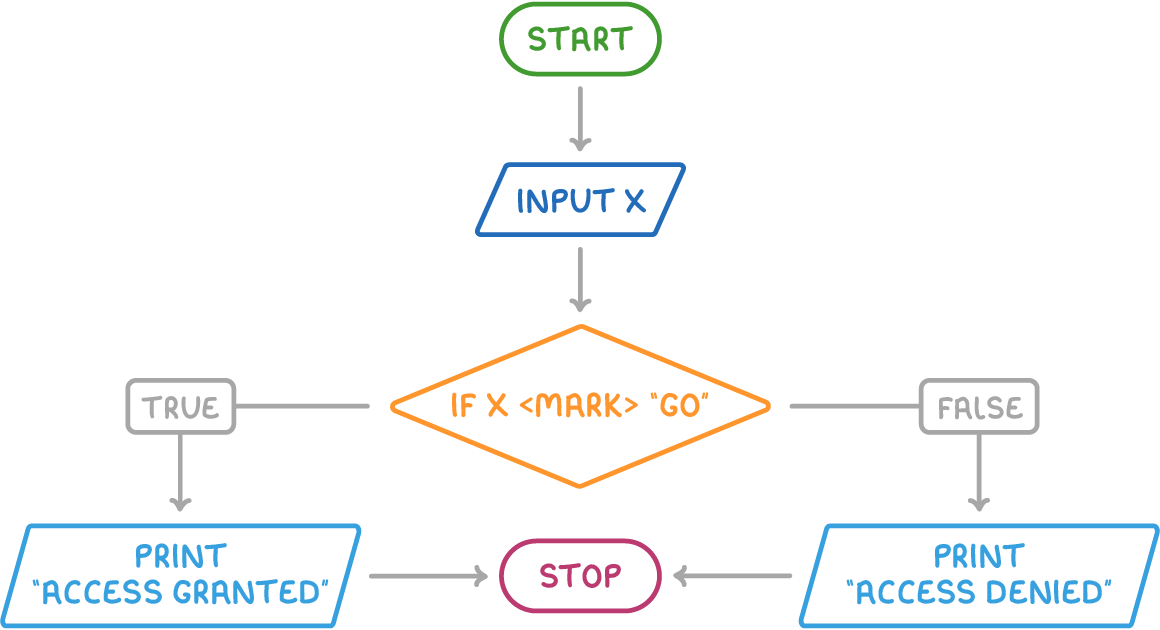
Here is pseudocode for a program that checks a passcode to grant or deny access:
How this example works:
- The condition
x </mark> "GO"is checked first. - If true, it prints "Access granted."
- If false, it prints "Access denied."
- Omitting the ELSE part is possible if no action is needed when the condition is false.
Nested if statements for complex decisions
Nested IF statements involve placing one IF statement inside another, allowing the program to check additional conditions only after the first one is true.
Why use nested if statements
- They enable multiple checks in sequence, building on previous results.
- Indentation helps show the structure, with inner IFs indented further.
Example of a nested if statement
Here is pseudocode for granting different access levels:
How this example works:
- The outer IF checks the passcode.
- If true, the inner IF checks the user type.
- Outcomes vary: unrestricted for teachers, restricted otherwise, or denied if passcode fails.
If-elseif statements for multiple conditions
IF-ELSEIF statements provide an alternative way to handle several conditions, checking each only if the previous one is false. Unlike nested IFs, they do not build deeper layers but test alternatives at the same level.
Key features of if-elseif statements
- All conditions are at the same indentation level.
- The program stops after finding the first true condition.
- An ELSE at the end handles cases where all conditions are false.
Example of an if-elseif statement
Here is pseudocode for different access levels based on user type:
How this example works:
- It checks "Teacher" first; if true, grants unrestricted access.
- If false, checks "Parent" next, and so on.
- If none match, it denies access.
Switch statements for variable values
SWITCH statements (also known as CASE SELECT) are selection statements that check the value of a single variable against a list of possible cases, executing code for the matching case. They are ideal when a variable can take specific, discrete values.
How switch statements work
- The statement starts with the variable to check (e.g.,
switch vote:). - Each 'case' specifies a value and the action to take if it matches.
- A 'default' case handles non-matching values.
- Indentation keeps the structure clear.
Example of a switch statement
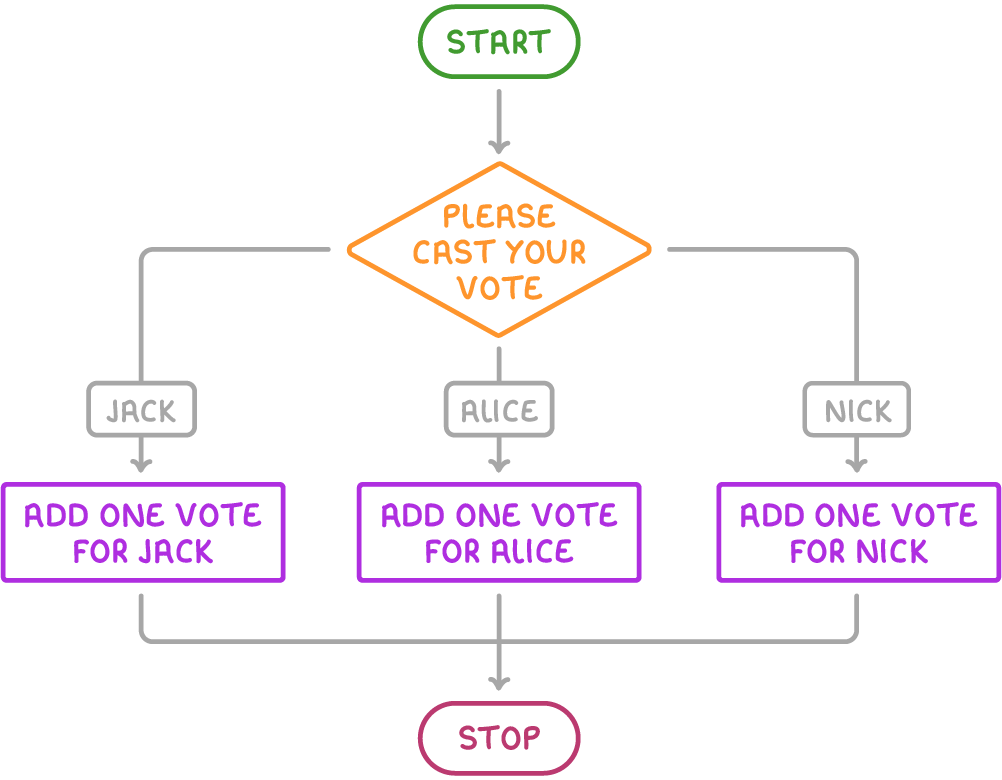
Here is pseudocode for a voting system that counts votes for candidates:
How this example works:
- Variables for votes start at 0.
- The switch checks the 'vote' input.
- It adds 1 to the matching candidate's total or shows an error via default.
Comparing switch and if-elseif statements
SWITCH and IF-ELSEIF statements both handle multiple possibilities, but they have distinct strengths and limitations.
When to use each type:
- Use SWITCH for simplicity when one variable has fixed values, like menu options.
- Choose IF-ELSEIF for broader flexibility, such as combining conditions from different variables.