8.6 - Loops
Understanding iteration in programming
Iteration is a fundamental programming concept where a section of code is repeated multiple times. Loops are the structures used to implement iteration, and they can be controlled by either a count or a condition.
There are two main types of loops:
- Count-controlled loops - These repeat a fixed number of times, determined by a counter.
- Condition-controlled loops - These repeat based on whether a condition is true or false.
Count-controlled loops with FOR statements
A FOR loop is a type of count-controlled loop that repeats the code inside it a specific number of times. The repetition is based on a counter variable that starts at an initial value, increases (or decreases) by a step value, and stops when it reaches an end value.
How FOR loops work
Components of FOR loops:
| Component | Description |
|---|---|
| Counter variable | A variable (e.g., k) that tracks the current iteration. |
| Initial value | The starting point for the counter (e.g., 1). |
| End value | The value at which the loop stops (e.g., 10). This can be a fixed number or a variable set during program execution. |
| Step count | The amount by which the counter changes each time (e.g., +3). If not specified, it defaults to +1. |
For example, in pseudocode, for k = 1 to 10 step 3 would set k to 1, then 4, then 7, then 10.
The counter variable can be accessed and used inside the loop for tasks like tracking progress or calculations.
Example of a FOR loop in pseudocode
Here's an example of a FOR loop in a simple voting system algorithm, where the loop allows exactly 100 votes to be cast:
Key points about this example:
- The loop repeats from
k = 1tok = 100, incrementing by 1 each time (default step). - The counter
kis used to display the number of votes cast after each input. - Note: Some programming languages do not use the
nextkeyword; instead, they define the loop body with indentation or braces.
Condition-controlled loops with WHILE and DO UNTIL
Condition-controlled loops repeat based on a logical condition rather than a fixed count. A condition is a boolean expression that results in True or False.
There are two main types: WHILE loops and DO UNTIL loops (sometimes called REPEAT UNTIL in some languages). They are similar but differ in where the condition is checked and whether the loop body runs at least once.
WHILE loops
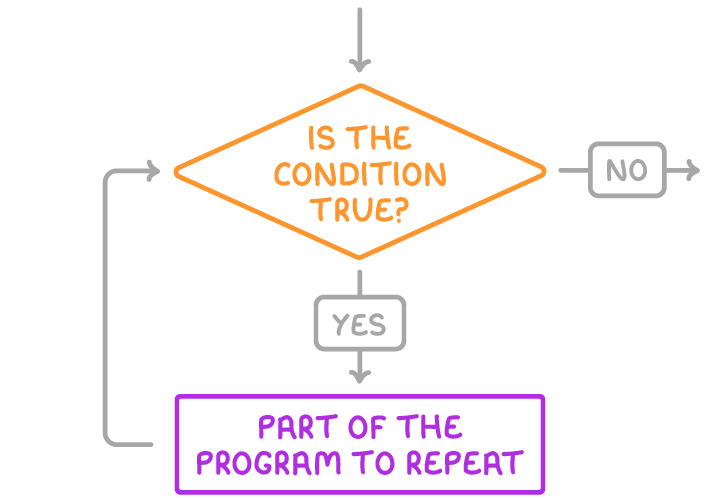
A WHILE loop checks the condition at the start of each iteration. It only executes the code inside if the condition is true, and it continues repeating while the condition remains true.
Key features of WHILE loops:
- Controlled by a condition at the start of the loop.
- Repeats while the condition is true (stops when it becomes false).
- Never runs at all if the condition is initially false.
- Can lead to an infinite loop if the condition never becomes false.
Flowchart representation:
| Step | Description |
|---|---|
| 1 | Check condition (e.g., Is total < target?) |
| 2 | If true, execute loop body |
| 3 | Return to step 1 |
| 4 | If false, exit loop |
DO UNTIL loops
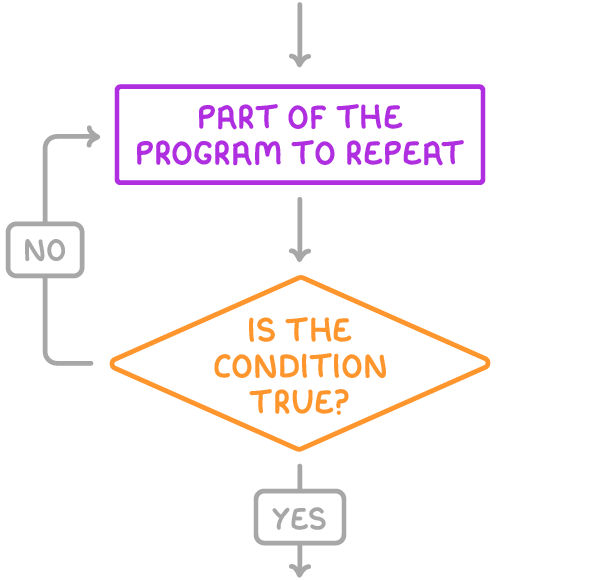
A DO UNTIL loop (or REPEAT UNTIL) checks the condition at the end of each iteration. It always executes the code inside at least once, then repeats until the condition becomes true.
Key features of DO UNTIL loops:
- Controlled by a condition at the end of the loop.
- Repeats until the condition is true (continues while it is false).
- Always runs at least once, even if the condition is initially true.
- Can lead to an infinite loop if the condition never becomes true.
Flowchart representation:
| Step | Description |
|---|---|
| 1 | Execute loop body |
| 2 | Check condition (e.g., Is total >= target?) |
| 3 | If false, return to step 1 |
| 4 | If true, exit loop |
Some programming languages use a DO WHILE loop, which is similar to DO UNTIL but repeats while the condition (at the end) is true. Like DO UNTIL, it always runs at least once.
Key differences between WHILE and DO UNTIL loops
Although WHILE and DO UNTIL loops can often achieve similar results, their differences affect how they behave in edge cases.
Comparison table:
| Aspect | WHILE Loop | DO UNTIL Loop |
|---|---|---|
| Condition position | At the start | At the end |
| Repetition rule | While condition is true | Until condition is true (while false) |
| Minimum executions | Zero (if condition initially false) | One (always runs at least once) |
| Infinite loop risk | If condition never becomes false | If condition never becomes true |
Practical example: Savings target algorithm
To illustrate both loops, consider an algorithm that someone could use to check if they have reached their savings target and also print the amount of excess money they have saved. The code before and after the loop is exactly the same.
Using a DO UNTIL loop
The loop starts at 'do' and ends when the 'until' condition is true — when the total is greater than or equal to the target.
Using a WHILE loop
The loop starts by checking the 'while' condition is true and keeps repeating until it is false — when the total is greater than or equal to the target.
Both of these loops work exactly the same when target > 0. (If target is 0, the WHILE loop won't expect an input, whereas the DO UNTIL loop will.)