2.2 - Secondary Storage
Overview of storage tiers
Computer systems use different tiers of storage to manage data efficiently, each with varying speeds, capacities, and purposes.
Primary storage
Primary storage consists of memory that the central processing unit (CPU) can access very quickly. This includes CPU registers, cache, read-only memory (ROM), and random access memory (RAM). It has the fastest read and write speeds and is mostly volatile, meaning data is lost when power is turned off.
Secondary storage
Secondary storage is non-volatile, so it retains data even without power. It stores operating systems, applications, and user files when they are not in use. Examples include hard disk drives (HDDs), solid state drives (SSDs), optical discs, and memory cards. Read and write speeds are slower than primary storage.
Tertiary storage
Tertiary storage is used for long-term archiving and backups of very large amounts of data.
Secondary storage is essential because primary storage is limited in capacity and mostly volatile. It allows data to be saved permanently and retrieved when needed, supporting everyday computing tasks.
Hard disk drives (HDDs)
Hard disk drives (HDDs) are a common type of secondary storage used inside computers like desktops and laptops. They provide high-capacity storage at a reasonable cost.
How HDDs work
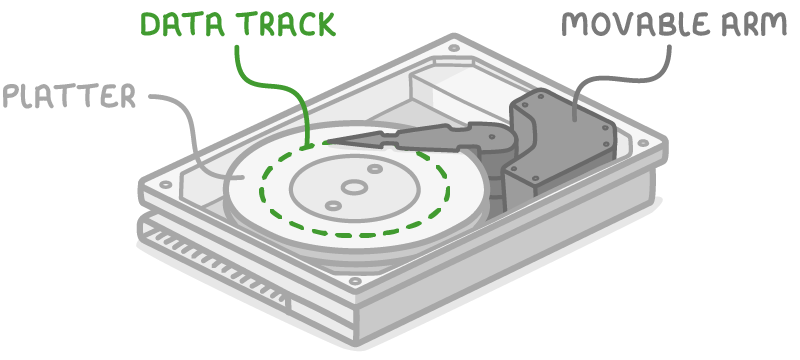
HDDs consist of a stack of magnetised metal disks, called platters, that spin at high speeds (thousands of revolutions per minute). Data is stored magnetically on circular tracks. A movable arm with a read/write head accesses these areas to store or retrieve data.
Key features of HDDs
- High capacity - They can store large amounts of data.
- Reliability - Despite having moving parts, HDDs are durable and long-lasting, though they can be damaged by strong impacts, such as dropping.
- Portability - External HDDs are popular for backing up and transporting big files.
- Limitations - They produce some noise from spinning, require defragmentation to maintain performance, and are vulnerable to physical shocks.
HDDs are suitable for storing large files like videos or databases where cost per gigabyte is important.
Solid state drives (SSDs) and flash-based storage
Solid state drives (SSDs) represent a modern alternative to HDDs, using electronic components rather than mechanical ones. Flash memory is a type of non-volatile memory that retains data without power.
How SSDs work
SSDs have no moving parts and store data using flash memory chips. They provide much faster read and write speeds than HDDs, leading to quicker boot times, faster program loading, and rapid file access.
Key features of SSDs
- Speed and efficiency - Ideal for operating systems and frequently used applications.
- Durability - More resistant to shocks and silent in operation.
- Hybrid drives - Combine SSD for fast access to the OS and programs with HDD for bulk data storage.
- Portable versions - External SSDs are used for backups and data transfer.
- Limitations - They have a limited number of write cycles before deterioration.
Other flash-based storage
Flash-based storage also includes USB pen drives and memory cards (e.g., SD cards). These are compact, solid-state devices using flash memory that expand storage in small devices like cameras, smartphones, and tablets, which cannot accommodate larger drives. They offer high capacity relative to size, but have slower speeds and shorter lifespan than SSDs.
Flash-based storage is great for portability and quick data transfer in everyday devices.
Optical discs and magnetic tapes
Beyond magnetic and solid-state options, other secondary storage types include optical discs and magnetic tapes, each suited to specific needs.
Optical discs
Optical discs are flat, circular storage media read by lasers, such as CDs, DVDs, and Blu-ray discs.
Capacities and types:
- CDs hold about 700 MB, DVDs around 4.7 GB, and Blu-ray discs up to 25 GB.
- Forms:
- Read-only (e.g., CD-ROM, DVD-ROM, BD-ROM) - Data cannot be changed.
- Write-once (e.g., CD-R, DVD-R, BD-R) - Data can be added once.
- Rewritable (e.g., CD-RW, DVD-RW, BD-RW) - Data can be erased and rewritten.
Features and uses:
- Advantages - Very cheap per GB, portable, and resistant to water or shocks (though easily scratched).
- Decline in use - Streaming services and faster internet have reduced their popularity; modern devices like tablets often lack optical drives.
- Limitations - Low capacity per disc, very slow read/write speeds, and lower reliability compared to flash storage.
Optical discs are still used for archiving small amounts of data or distributing media where cost is key.
Magnetic tapes
Magnetic tapes are sequential storage media used for high-volume data archiving.
How magnetic tapes work:
- Data is stored on long reels of magnetic tape inside plastic cassettes.
- Reading and writing is sequential, starting from the beginning, which makes accessing specific data slow but allows fast transfer once positioned.
Key features:
- High capacity - Greater than HDDs, with very low cost per GB.
- Uses - Large organisations use them for backups and archives in tape libraries.
- Requirements - Need a special tape drive for access.
- Suitability - Best for frequent, large-scale backups where speed for random access is not critical.
Magnetic tapes are ideal for businesses handling massive data volumes that do not require frequent retrieval.
Comparisons of secondary storage types
Different secondary storage options vary in speed, cost, capacity, and suitability. Choosing the right type depends on needs like portability, durability, or budget.
Advantages of HDDs vs SSDs
| Advantages of HDDs | Advantages of SSDs |
|---|---|
| - Cheaper per GB - Higher overall capacity - Longer read/write life | - Faster read/write speeds - No need for defragmentation - More resistant to shocks - Silent operation |
Overall comparisons
Average read/write speed (from slowest to fastest):

- Optical discs
- Memory cards
- Magnetic tapes
- HDDs
- SSDs
Average cost per GB (from cheapest to priciest):

- Magnetic tapes
- Optical discs
- HDDs
- Memory cards
- SSDs
Average capacity (from lowest to highest):

- Optical discs
- Memory cards
- SSDs
- HDDs
- Magnetic tapes
These comparisons show that no single type is best for everything; for example, SSDs excel in speed for everyday use, while magnetic tapes are optimal for archiving vast data sets.