5.2 - Utility Software
Introduction to utility software
Utility software consists of programs designed to help maintain, configure, or optimise a computer's performance. These tools often come pre-installed with the operating system (OS), which is the software that manages hardware and software resources on a computer. However, users can install additional utilities to handle specific tasks beyond the standard ones.
Key roles of utility software:
- Maintenance - Utilities can clean up storage, fix errors, and improve efficiency.
- Configuration - They allow users to adjust system settings for better performance or security.
- Additional features - Extra utilities might include tools for data recovery, virus scanning, or file management, expanding on what the OS provides.
By using these programs, computers run more smoothly and securely, preventing issues like slow performance or data loss.
Defragmentation utilities
Over time, files on a hard disk drive (HDD) can become scattered, leading to slower access times. Defragmentation utilities address this by reorganising data, making the system more efficient. An HDD is a storage device that uses spinning disks and a read/write head to store and retrieve data.
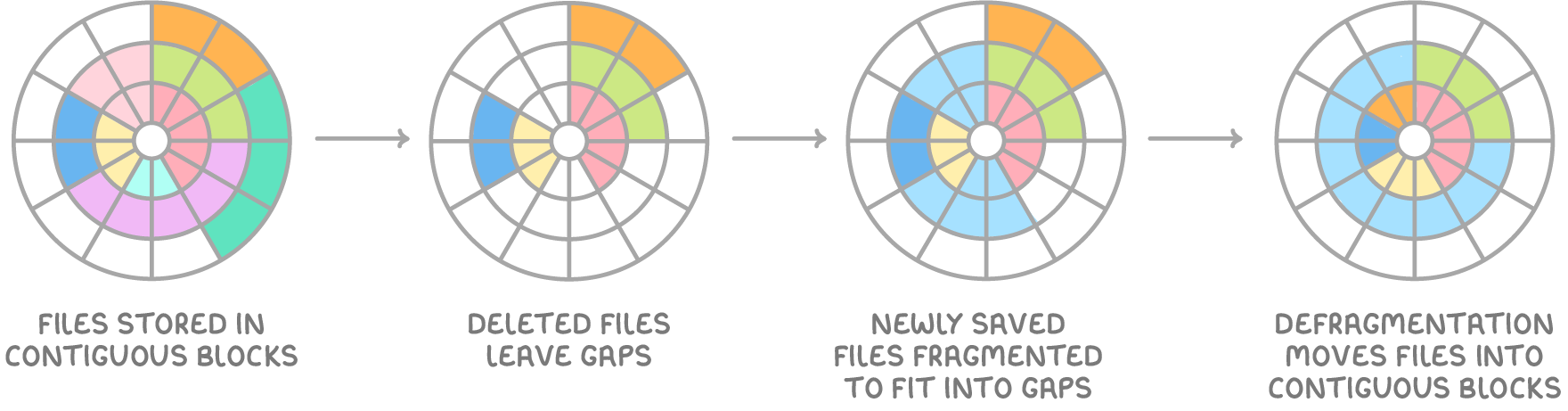
How fragmentation occurs:
- Files are initially stored in continuous blocks on the HDD wherever space is available.
- As users delete, move, or resize files, small gaps appear across the disk.
- When saving new files, the OS splits them into smaller pieces to fit into these gaps, causing fragmentation.
- This scattering forces the read/write head to jump around the disk, slowing down file reading and writing.
The process of defragmentation
Defragmentation software reorganises the data as follows:
- It identifies fragmented files, which are files broken into non-contiguous blocks.
- The software moves these blocks to reassemble complete files in one place.
- It also gathers all free space into a single large area to reduce future fragmentation.
As a result, file access becomes faster because the read/write head moves less.
Considerations for different storage types:
- HDDs - Defragmentation is beneficial here due to the mechanical nature of the drive, which relies on physical movement.
- Solid-state drives (SSDs) - These use flash memory with no moving parts, so fragmentation does not affect performance. In fact, running defragmentation on an SSD can harm it by using up its limited number of read/write cycles, potentially shortening its lifespan.
Compression software
Compression software reduces the size of files, making them easier to store and transfer. This is achieved by reducing redundancy through efficient encoding of the data.
Types of compression:
- Lossless compression - Reduces file size by encoding data more efficiently, allowing full reconstruction and preserving the original file quality (e.g., used for text or program files).
- Lossy compression - Permanently discards some data to achieve greater size reduction, which may slightly lower quality but is suitable for images or audio (e.g., JPEG or MP3 formats).
Benefits and process of compression:
- Reduced storage needs - Compressed files occupy less space on disks or drives.
- Faster transfers - Smaller files download or upload more quickly over networks.
- Common formats - Examples include
.zipfor general use and.rarfor more advanced compression.
To use a compressed file, it must first be extracted, which reverses the process and restores it to its original form.
Steps in compressing and extracting files:
- Select the file or folder and apply the compression software to shrink it.
- The software creates a new, smaller file in a compressed format.
- To access the content, use extraction tools to unpack it back to the original size and structure.
This utility is especially useful for archiving large amounts of data or sending files via email.
Encryption software
Encryption software protects data by making it unreadable to unauthorised users. It scrambles the information using complex algorithms, ensuring security during storage or transmission.
How encryption works:
- Encryption process - The software converts plain data into a coded form called ciphertext using a mathematical algorithm.
- Decryption - To read the data, a special key (a unique code or password) is required, along with the software's instructions to reverse the scrambling.
- Security strength - Modern encryption methods are highly secure and resistant to attacks, such as brute force attempts where hackers try guessing the key repeatedly.
Benefits of using encryption:
- Data protection - Even if data is intercepted or stolen, it remains inaccessible without the key.
- Privacy for users - It safeguards sensitive information, like personal details or financial records, from third parties.
- Compliance and trust - Businesses use encryption to meet legal requirements and build confidence with customers.
Encryption is commonly applied to files, emails, or entire drives, and only authorised recipients with the key can access the original content.