2.9 - Sound
Analogue and digital sound
Sound exists in two main forms: analogue and digital. Computers can only process digital sound effectively, so analogue sound must be converted before it can be stored or manipulated.
Analogue sound
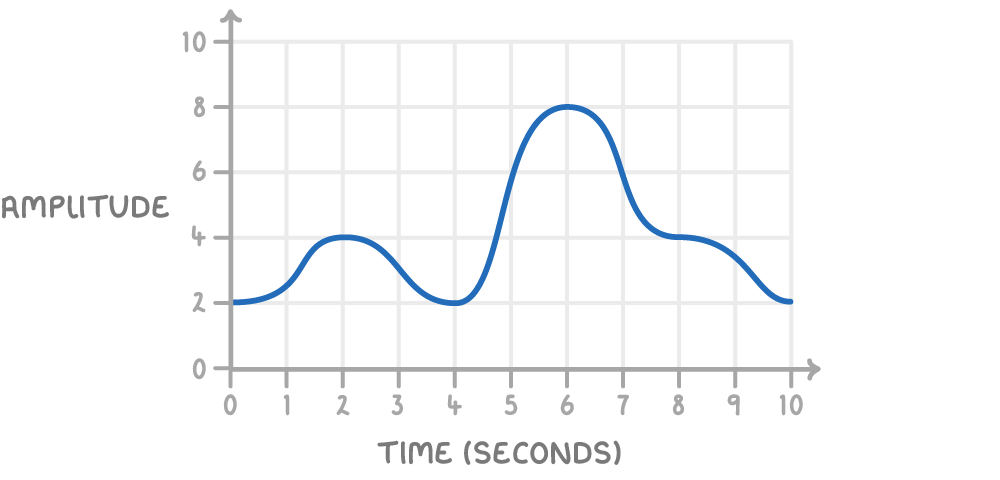
Analogue sound is a continuous wave of data that varies smoothly over time, such as the natural vibrations captured by a microphone during recording.
Digital sound
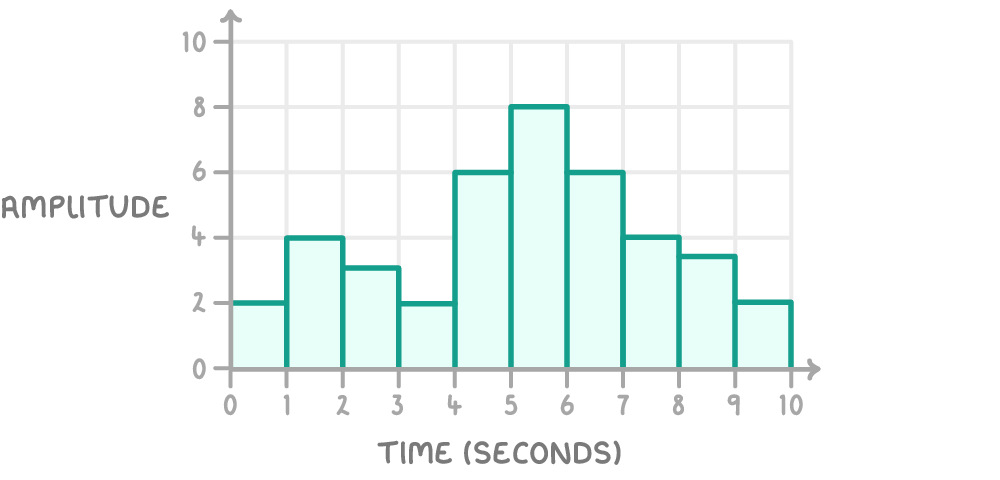
Digital sound is a discrete representation of sound, broken into individual pieces of data (samples) that computers can read, store, and process.
To convert analogue sound into digital form, devices use an analogue to digital converter. These converters are built into most modern recording equipment, like microphones in smartphones or computers.
The sampling process
Sampling is the method used to transform a continuous analogue sound wave into a digital format that approximates the original. This process captures key points of the wave at regular intervals, creating a series of digital values.
Steps in the sampling process:
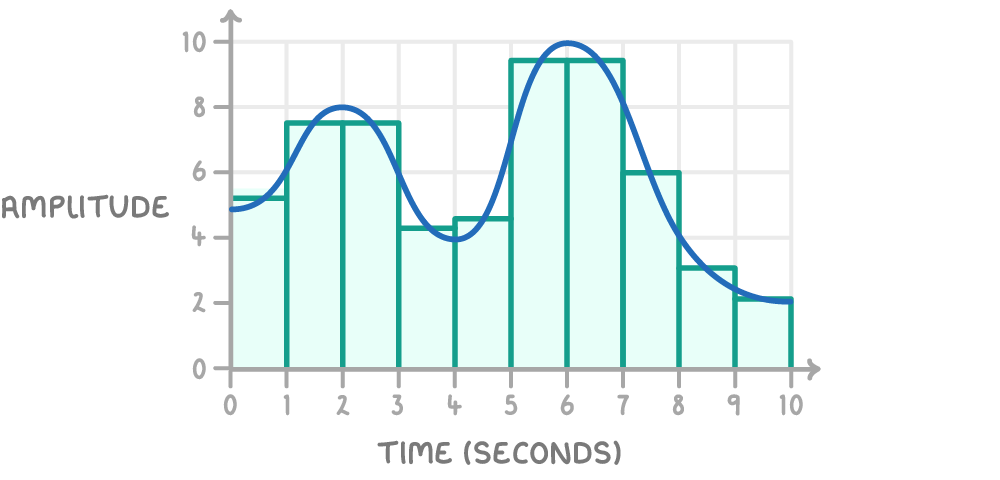
- A microphone records the sound as an analogue signal, which is a continuous wave showing changes in amplitude (strength of the sound) over time.
- The analogue signal is sampled by measuring its amplitude at fixed time intervals, converting these measurements into binary data.
- The sampled points are then used to reconstruct the sound digitally, forming a stepped approximation of the original wave.
The digital version is not identical to the analogue original because some data is lost between samples. However, taking samples more frequently creates a closer match. For example, music recordings often sample every few milliseconds rather than every second to preserve quality.
Visualising sampling with graphs
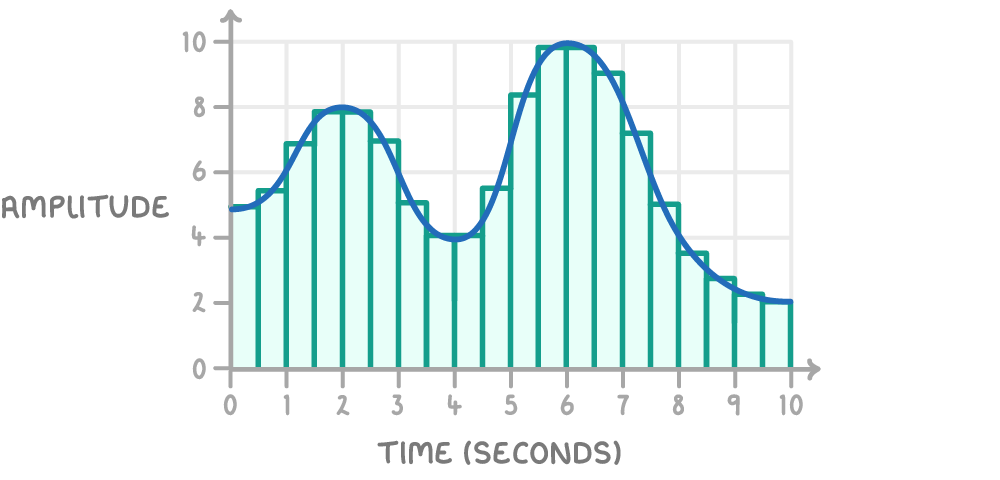
Increasing the number of samples reduces the 'flat' areas in the digital version, making it sound more like the analogue recording.
Factors influencing sound quality and file size
Several elements determine how well a digital sound file represents the original recording and how much storage space it requires. Adjusting these factors involves a trade-off between quality and efficiency.
Main factors affecting sound files:
- Sample rate - This is the number of samples taken per second, measured in hertz (Hz) or kilohertz (kHz). For instance, a typical rate for music is 44.1 kHz, meaning 44,100 samples per second. A higher sample rate captures more detail, improving quality by making the digital sound closer to the analogue wave, but it also increases file size.
- Bit depth - This refers to the number of bits used to represent each sample's amplitude. A higher bit depth allows for more precise values, capturing subtle differences like quiet sounds alongside loud ones, which enhances overall quality. However, this also enlarges the file.
- Length - The duration of the sound in seconds directly impacts file size, as longer recordings require more samples.
Increasing either sample rate or bit depth results in better audio fidelity but larger files, which can affect storage and transmission speeds.
Bit rate
Bit rate combines sample rate and bit depth to indicate the data processed per second.
Formula for bit rate:
Where:
- Bit rate = Amount of data per second (in bits per second)
- Sample rate = Samples per second (in Hz)
- Bit depth = Bits per sample
Calculating sound file size
The size of a digital sound file can be determined using a formula that accounts for the sampling factors and duration.
Formula for sound file size:
Where:
- Sample rate (in Hz) = Number of samples per second
- Bit depth = Number of bits per sample
- Length (in seconds) = Duration of the sound
This formula gives the total bits required; to convert to bytes, divide by 8.
Worked example - Calculating sound file size
A 45-second audio clip is sampled at a rate of 800 Hz with a bit depth of 16 bits. Calculate the file size in bits.
Step 1: Identify the values
- Sample rate = 800 Hz
- Bit depth = 16 bits
- Length = 45 seconds
Step 2: Apply the formula
Step 3: Perform the calculation
First, 800 × 16 = 12,800
Then, 12,800 × 45 = 576,000 bits
Step 4: Interpretation
The file requires 576,000 bits of storage. If the sample rate or bit depth were increased for better quality, the size would grow accordingly.