1.3 - CPU Performance
Factors affecting CPU performance
The performance of a computer system largely depends on its hardware components, with the CPU playing a central role. Several key features of the CPU determine how quickly and efficiently it can process instructions. These include clock speed, the number of cores, and cache size, each contributing in different ways to overall speed.
Clock speed
Clock speed measures how many clock cycles a CPU core can complete in one second, expressed in hertz (Hz). For example, a clock speed of 4.0 GHz means the core can complete 4.0 billion clock cycles per second.
Effects of clock speed on performance:
- A higher clock speed allows more instructions to be processed in the same amount of time, leading to faster performance.
- Some CPUs can be overclocked, which means increasing the clock speed beyond the manufacturer's default setting to boost speed. However, this carries risks, such as overheating that could cause system crashes or long-term damage. To manage this, advanced cooling methods like water cooling are often required.
Clock speed is a fundamental factor because it directly impacts the rate at which basic operations occur, though it works in combination with other CPU features for optimal results.
Number of cores
Cores are independent processing units within a CPU that can handle tasks separately from one another.
Benefits and limitations of multiple cores:
- More cores enable the CPU to process multiple instructions simultaneously, improving efficiency for handling large amounts of data.
- Modern devices, such as PCs and smartphones, typically have four or more cores to support multitasking.
However, the benefits are not always straightforward. Software must be designed to take advantage of multiple cores through parallel processing. Additionally, some tasks cannot be divided evenly, as certain steps may rely on the completion of others, causing one core to wait and potentially limiting the overall speed gain.
Cache size
Cache is a small, high-speed memory area built directly into the CPU, which stores frequently used data for quicker access than retrieving it from the main RAM.
Impact of cache on performance:
- A larger cache provides faster access to more data, reducing the time the CPU spends waiting for information and thus enhancing performance.
In general, CPUs with higher clock speeds, more cores, or larger caches offer superior performance but come at a higher cost. When evaluating CPUs, consider how these factors balance against the specific needs of the system, such as for gaming or general use.
The role of RAM in system speed
RAM (random access memory) is a type of volatile memory that temporarily stores data for quick access by the CPU. It plays a vital role in determining how smoothly a system runs, especially when juggling multiple applications.
How RAM influences performance
Effects of RAM on system speed:
- Insufficient RAM can slow down a system because it forces the use of virtual memory, where the slower hard drive acts as an extension of RAM, leading to delays.
- More RAM allows the system to run additional applications or those that require a lot of memory without slowdowns, resulting in a faster and more responsive experience overall.
- Upgrading RAM is straightforward on devices like PCs and laptops; it involves swapping out existing RAM modules (often called sticks) for ones with greater capacity or speed.
- However, if the system already has enough RAM for the user's needs, adding more may not noticeably improve performance, as the benefits plateau.
RAM works closely with the CPU by providing the data it needs quickly. For example, when opening a large file or running complex software, ample RAM ensures the process feels seamless, preventing frustrating lags.
Upgrading RAM
RAM modules are physical components that slot into the motherboard. They consist of circuit boards with multiple chips that store data.
Steps to upgrade RAM:
- Check the motherboard's compatibility for capacity and speed.
- Replace existing sticks with higher-capacity ones.
- Restart the system to recognise the new RAM.
This upgrade can transform a sluggish computer into one that handles demanding tasks more effectively.
The function of GPUs in graphics processing
GPUs (graphics processing units) are specialised hardware designed to manage graphics and image-related tasks, which helps distribute the workload away from the CPU.
Key features of GPUs
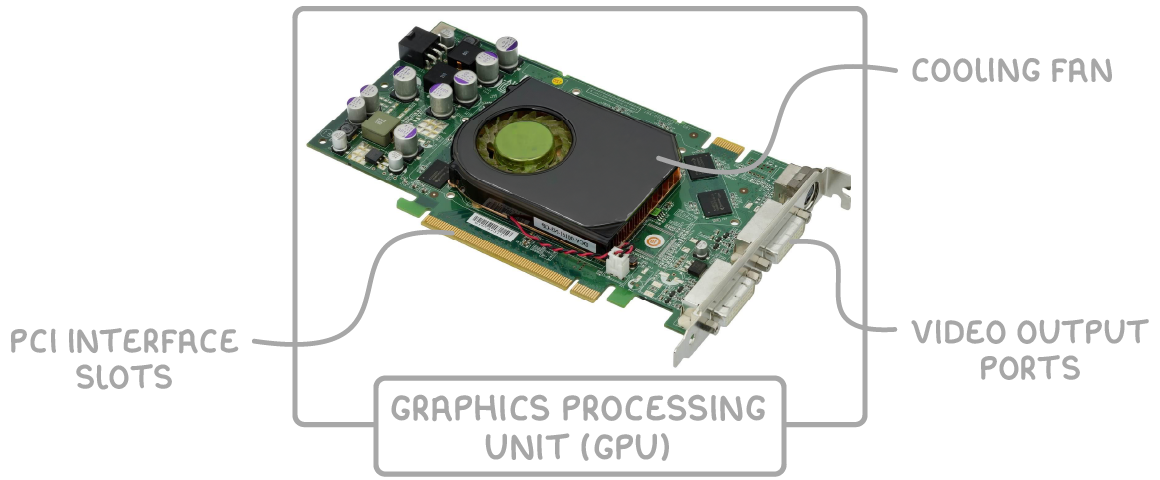
How GPUs improve system performance:
- GPUs offload graphics processing from the CPU, allowing the CPU to focus on other operations and improving overall system efficiency.
- Basic GPUs are often integrated into the motherboard or directly onto the CPU for everyday tasks.
- For superior performance in graphics-heavy activities, such as gaming or design work, a dedicated GPU (also known as a graphics card) is used. These cards feature components like cooling fans, video output ports, and interfaces that connect to the motherboard via PCI slots.
By handling complex image calculations, a high-quality GPU can dramatically enhance speed and quality in applications that rely on visuals. For instance, in PC gaming, a dedicated GPU ensures smoother frame rates and more detailed rendering, making the experience more immersive.
Integrated vs dedicated GPUs
Comparison of GPU types:
- Integrated GPUs - Built-in and sufficient for basic tasks like web browsing or simple video playback, but they share resources with the CPU, which can limit performance.
- Dedicated GPUs - Separate cards that provide more power for intensive applications, freeing up the CPU and often including their own memory and cooling systems.
Choosing between them depends on the user's needs; graphic designers or gamers benefit most from dedicated options to avoid bottlenecks in performance.